
In short: Odoo 20 adds a cheaper licence called the Light User for staff who use Odoo only for their own tasks: time off, expenses, attendance, payslips, Point of Sale and shop-floor work. It also bills every active employee record that has no full login as a Light User. Companies whose front-line staff had full logins will save money. Companies that kept large teams in the Employees app or ran payroll without logins will pay more.
Odoo launched version 20 at Odoo Experience on 24 September 2026, and changed its pricing the same day. Most coverage focuses on the new, lower Light User price. For many existing customers, though, the more important change is in the definition, not the price.
This guide covers what a Light User is, what it costs, who counts, how to work out whether your bill goes up or down, and whether to upgrade now or wait.
What is a Light User in Odoo 20?
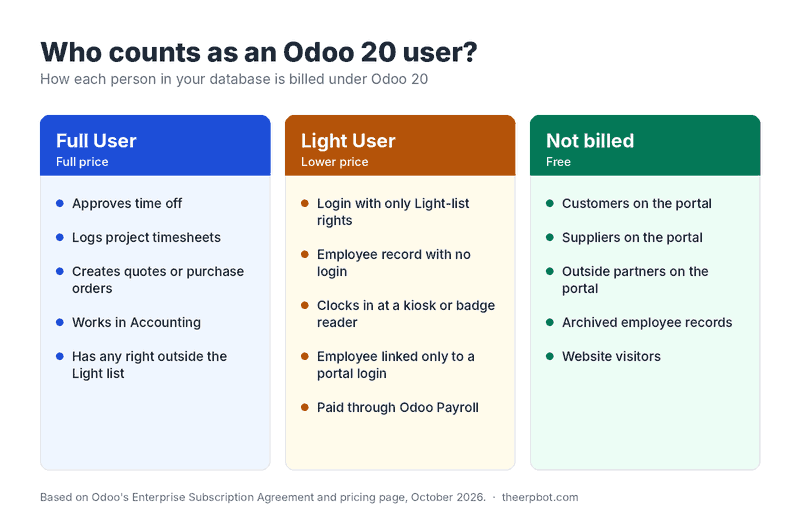
A Light User is a lower-priced Odoo 20 licence for people who use Odoo only for their own work, not to run business processes. Under Odoo's Enterprise Subscription Agreement, you are billed for a Light User in two situations:
- A login with the Light role. The person has an Odoo account, and all of their access rights fall within Odoo's Light list.
- An employee record with no full login. The person exists in the Employees app but is not linked to an active internal (non-portal) user.
⚠️ The second point is the one that catches companies out. Someone who never logs in to Odoo can still appear on your invoice.
What can a Light User do, and what needs a full User?
Light Users cover self-service HR and front-line operations. Anything that creates commercial, financial or configuration data needs a full User.
Timesheets are the most common surprise. They are not on the Light list, so in a services business where most staff log billable hours, those staff stay full Users.
How much does an Odoo Light User cost?
The Light User is US$8.90 per month on Odoo's US pricing page, €7.90 in Europe and Rs 195 in India. You can't buy it at checkout: Light User licences are quoted by an Odoo Advisor.
Indian list prices, before GST, per user per month:
Other pricing changes announced at the same time:
- Standard plan: unchanged.
- Custom plan: up 20%. Custom is the plan you need for Odoo.sh, on-premise hosting, Studio and custom modules.
- Existing contracted users: renewal increases are capped at 7% per year under the subscription agreement.
- Monthly subscribers: the new prices apply from the next invoice.
- Light User pricing: applies only on Odoo 20 or later, and may require signing a new agreement.
For Saudi Arabia, Kuwait and the wider GCC: these countries are billed on a USD price list that is much cheaper than US pricing. Light User pricing for the region isn't clearly published yet, so get the figure in writing from your Odoo Advisor before you budget.
Not sure whether you need Standard or Custom? Read our comparison of Odoo Online vs Odoo.sh vs on-premise.
Who counts as a Light User?
Anyone with a Light-role login, plus every active employee record not linked to a full user, counts as a Light User. Customers and suppliers on the portal stay free.
💡 The payroll effect most guides miss
Odoo Payroll calculates payslips from employee records, so every person you pay through Odoo Payroll is now at least a Light User. A company that runs payroll for 150 staff, of whom only 20 log in, now pays for 130 additional licences.
This doesn't mean you should take payroll out of Odoo. Keeping HR, attendance, payroll and accounting integrated is usually worth far more than the licence cost. It does mean the decision now has a monthly price attached, and that price belongs in your budget.
🔒 Why the "portal workaround" no longer works
Some companies gave staff portal logins for leave requests to avoid paying for internal users. Under Odoo 20's definition, an employee linked only to a portal account still counts as a Light User. Odoo's software also reports user counts to Odoo automatically, so you can't hide records from the count.
Will your Odoo bill go up or down?
It depends on one thing: how many front-line staff currently have full logins versus how many sit in the Employees app without one.
New monthly licence = (full Users × full price) + (Light Users × Light price)
Your saving comes from full Users you can move down to Light.
Your new cost comes from employee records that were never billed before.
Below are three common cases, using Indian Custom-plan prices after the first year (Rs 1,350 per full User, Rs 195 per Light User, before GST).
Scenario 1: Manufacturer, bill goes up
40 people: 8 office staff with logins, and 32 operators who exist only as employee records for attendance kiosks and payroll.
- Before (only logins billed): 8 × 1,350 = Rs 10,800 per month
- Odoo 20: 10,800 + (32 × 195) = Rs 17,040 per month
- Change: +Rs 6,240 per month (+58%), or about Rs 74,900 per year
Scenario 2: Multi-store retailer, bill goes down
30 people: 6 managers and back-office staff, plus 24 cashiers who each had their own full login.
- Before: 30 × 1,350 = Rs 40,500 per month
- Odoo 20: (6 × 1,350) + (24 × 195) = Rs 12,780 per month
- Change: −Rs 27,720 per month (−68%)
This is typical of multi-location retail and POS setups. Before you plan around these savings, confirm with your partner exactly which POS steps your cashiers perform. Opening and closing sessions may still need a full User.
Scenario 3: Services firm, nothing changes
30 consultants who all log billable timesheets. Timesheets need full Users, so Light Users don't help. The bill only moves if this firm is on the Custom plan, where the 20% increase applies to newly added users and the 7% cap applies at renewal.
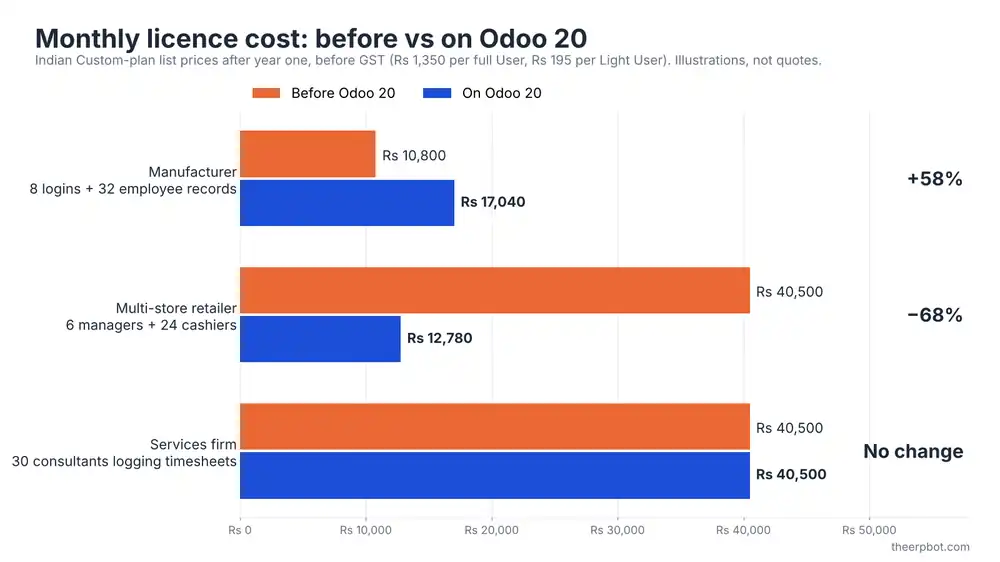
These figures are illustrations, not quotes. Run the formula with your own counts and your country's price list.
Not sure which side of this your business lands on?
We'll map every login and employee record to the right licence and tell you the number before you commit to an upgrade.
Should you upgrade to Odoo 20 now, or stay on Odoo 19?
Light User pricing only applies once you are on Odoo 20, but staying on an older version has its own cost. Since April 2026, Odoo adds a 25% annual surcharge to Enterprise subscriptions running a version older than the three most recent releases. With Odoo 20 out, the covered releases are now 18, 19 and 20.
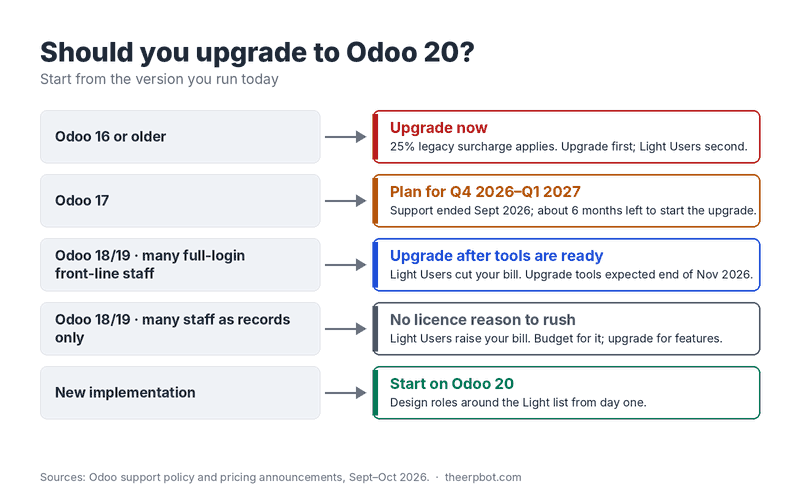
Odoo's agreement says employee-record billing applies where your software version supports it. Whether employee records are already counted on Odoo 19 is not clearly answered in public, so ask your Odoo Advisor and get the answer in writing.
See how one client handled a version jump in our upgrade success story.
How to measure your Light User exposure before you upgrade
You can estimate your Odoo 20 licence count today, on Odoo 16, 17, 18 or 19, in about 15 minutes.
- Count employee records without a user. Go to Employees, open the filter options, and add a custom filter where Related User is not set. Note the total.
- Find employees linked only to portal users. Group active employees by Related User and check which of those users are portal users. Add these to your count.
- List internal users by what they actually do. In Settings → Users, review each internal user. Mark the ones who only do time off, expenses, attendance, payslips, POS, barcode or shop-floor work. They are candidates for Light.
- Keep approvers and timesheet loggers in mind. Team leads who approve leave, and anyone logging project hours, stay full Users.
- Archive leavers. Former employees left active in the Employees app will be billed. Archived records are not.
- Apply the formula. Multiply full Users and Light Users by your country's prices and compare the result with your current invoice.
If you work with a partner, ask them to do this as part of upgrade planning. A partner can also check whether your custom modules give users rights that would quietly turn a Light User into a full User.
Ways to keep your licence count accurate
- Archive former employees promptly. This is the easiest and largest saving for most companies.
- Design roles around the Light list. One extra access right, even read-only Sales, can move a person into the full-price tier.
- Review roles every quarter. Rights tend to accumulate when people change jobs.
- Decide deliberately about shared POS logins versus individual ones. Individual cashier records give you per-cashier traceability. In Odoo 20, each one is a Light User, so weigh the control you get against the cost.
- Put payroll licences in the budget. If integrated payroll is worth it, and it usually is, plan for the cost rather than reacting to it.
- Get your quote in writing before you upgrade, including Light User prices and any requirement to sign a new agreement.
🚫 Don't try to evade the count. Deleting HR records, misclassifying staff, or relying on portal workarounds breaks the agreement and usually costs more when it is found during an audit.
Common mistakes
- Assuming Light Users only reduce costs. For companies with many employee records and few logins, they increase costs.
- Moving timesheet users to Light. Timesheets are not on the list, so those people will be pushed back to full Users.
- Forgetting leave approvers. Approving time off needs higher rights than requesting it.
- Upgrading before counting. Do the exposure audit on your current version first.
- Budgeting with another country's prices. Odoo prices differ a lot by region. Use your own country's price list or a written quote.
Frequently asked questions
Click a question to expand the answer.
The bottom line
The Light User is neither simply a price cut nor simply a price rise. It moves cost toward having staff in the Employees app and away from giving front-line staff full logins. Retailers and warehouses that gave everyone a login will save. Manufacturers and payroll-heavy businesses that kept staff as records only will pay more.
The companies that handle this well will count their exposure before upgrading, design roles around the Light list, and get their quote in writing.
Let TheERPBot run your licence & upgrade review
We map every user and employee record to the right licence, estimate your Odoo 20 cost, and plan the upgrade around it.
Book a licence review